The Object Channel system is a way for objects to refer to other objects without knowing explicitly about each other. Rather than addressing a specific object, a reference to a channel, to which an object is assigned, can be used instead.
For example, if an action that wants to set the position of an object, it could specify a channel (say, the Green channel) rather than a specific object in the scene. When this action is run, Story Machine will look up the Green channel and provide the object assigned to it to the action.
Channels are a way to help make reusable blocks of actions. In the example above, we could specify that whichever object the user last clicked on is assigned to the Green channel. Thus the action described above could modify the scale of any clickable action in the scene, without each of those objects needing to duplicate the position setting code.
Note that the Current Object channel is special. See details below.
Channels in Detail
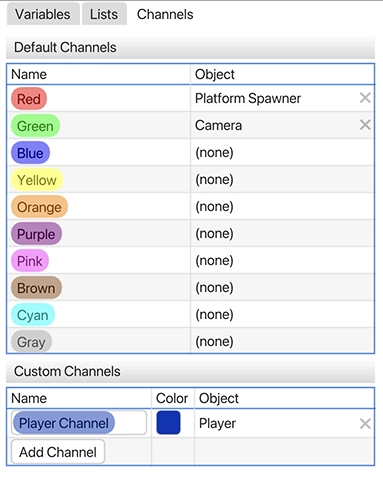
Story Machine provides several object channels by default, each associated with a color. Each channel can hold at most one object reference, and the contents of each channel can change from scene to scene. You can assign objects to channels manually using the Channels pane, which is found under Window > Channels. Channels can also be assigned and changed at runtime using the Assign Object action.
If an action references an empty channel, an error will be thrown in the Debug Log.
Custom Channels
In addition to the default channels that Story Machine supplies, you can define your own named channels in the Channels pane. Channels defined here are available to all scenes in the project.
Pro Tip
Channels are a great way to refer to scene objects from action sequences contained in snippets. Because Snippets are not associated with any given scene, it can be hard for snippet actions to talk to the scenes that they are spawned in. Channels provides a way around this. For example, if a snippet needs to send a trigger to the player object, a channel can be defined that always holds the player object, and the snippet can refer to that channel. Even if the snippet is spawned in multiple scenes that contain different player objects, it will still continue to work as long as each player is correctly assigned to its channel.
Current Object
The Current Object channel is a special type of object channel that is not assignable from the Channels pane. Unlike other channels, the Current Object is not globally shared across the entire scene. Instead, each action sequence owns its own Current Object, and passes it along to any sub-action sequences that it invokes.
The Current Object can be set with the Assign Object action, but it is also regularly set by other actions, such as the Spawn Snippet action (the newly spawned object is assigned to the Current Object channel), the Check if Objects Overlap action (the overlapping object is set to the Current Object channel), and the Raycast action (the object hit by the ray becomes the Current Object). Generally, when an action selects or discovers another object, that object is stored in the Current Object channel so that the rest of the action sequence can do work on it. It is common, for example, to spawn a snippet and then adjust it with subsequent actions that work on the Current Object channel.
The Current Object is automatically shared between action sequences and sub-actions. For example, an action sequence that spawns a new action sequence with a Check Variable will share its current object with the Match and Non-Matching sequences. Additionally, if a sub-action (such as one of those Check Variable branches) changes the Current Object, it will be changed for the parent action sequence as well.
However, the Current Object is not shared across triggers. Sending a trigger to an object with the (Send Trigger)[Actions/Send_Trigger] action will not send the Current Object. The sender and the receiver will maintain separate Current Objects, unless the Send Context option is selected on the Send Trigger action. When context is sent with the trigger, the Current Object is copied to the receiver. The channels are still separate: changing the Current Object in the receiver will not affect its definition in the sequence that sent the trigger, but the initial value of the Current Object will be shared when the triggered action sequence begins.
The idea with “Current Object” is to define a temporary reference to “the object I am working on” to allow sequences to be authored without explicit object references. A spawned snippet does not exist until it is spawned, so it can’t be referenced by scene actions unless it is assigned to a channel, and so the Current Object is used as the default channel to store it. This system is also useful as a way to make generic blocks of code. You can make an action sequence that, for example, aligns the current object to the next empty row in a grid, and then cycle through different objects with the same action sequence to align them all.
Note that Current Objects are only valid during the lifetime of the action that owns them. When the parent action sequence ends, the definition of that sequences’s Current Object is lost. If you need to track an object across multiple invocations of an action, assign it to one of the color-based global channels.